Unplug Risk Reward
Draw your trade, get the contracts from your risk, and let the stop and targets place themselves once your entry fills.
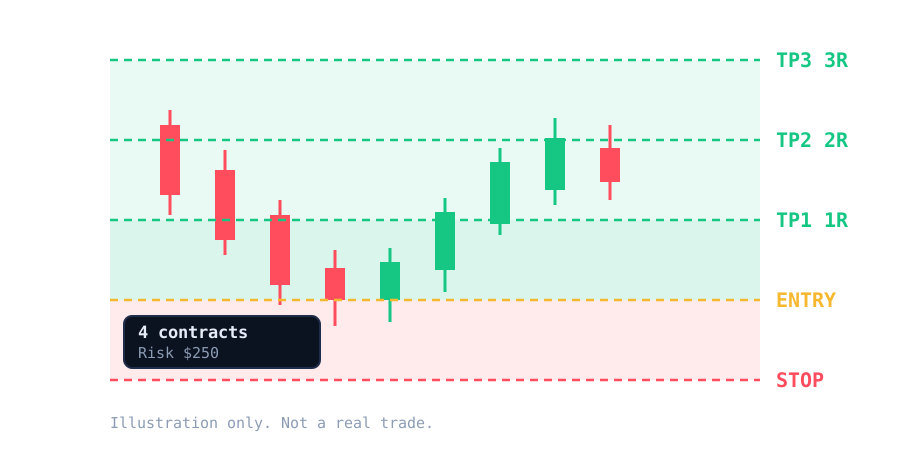
Your risk in, your contracts out
- Contracts from your risk: choose a fixed dollar amount or a percent of the account selected in Chart Trader. The tool works out the contracts, commission included, and respects the maximum you set.
- Up to five take profits: each placed at a multiple of your risk, such as 1R, 2R or 3R.
- Automatic stop and targets: with automatic orders on, when your entry fills at the entry line the tool sends your stop and targets for you. If the position already has a stop, it does nothing.
- Split your exit: send everything to one target, or split the contracts across your targets by percentage. Each part gets its own stop.
- Break-even and trailing stop: move the stop to entry after a profit you define, then let it follow the price.
- Drag to adjust: moving the stop or a target on the chart moves the live orders too.
- Chart Trader quantity: the calculated contracts can fill the quantity box for you.
From idea to protected trade in four steps
Everything happens on your chart, with the account you already use in Chart Trader.
Draw
Pick the tool and click three points on the chart: your entry, your stop and your first target. Drag any line to adjust it.
Set your risk
Enter the dollars you are willing to lose, or a percent of the account. The info box shows the contracts and the risk.
Enter your trade
Place your entry order as you always do. When it fills at the entry line, the tool sends your stop and targets.
Manage it
Break-even and trailing move your stop as the trade works, and split exits take profit in parts.
Take profit your way
Split the position across targets, then let break-even and trailing protect what is left.
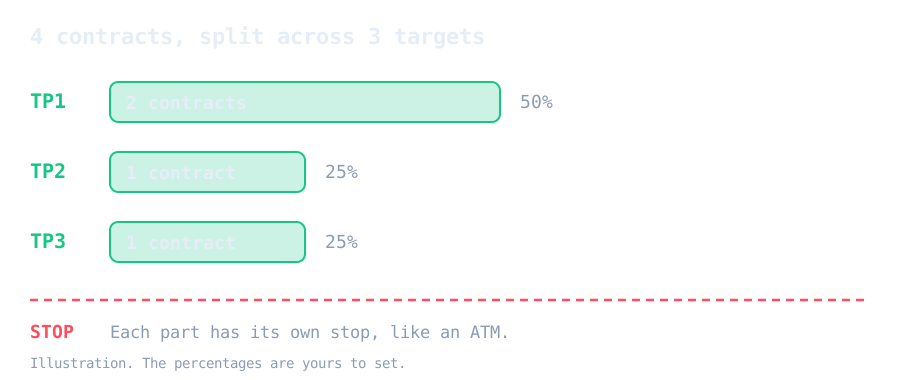
Send all contracts to one target, or split them by percentage. Each part gets its own stop and target, like an ATM.
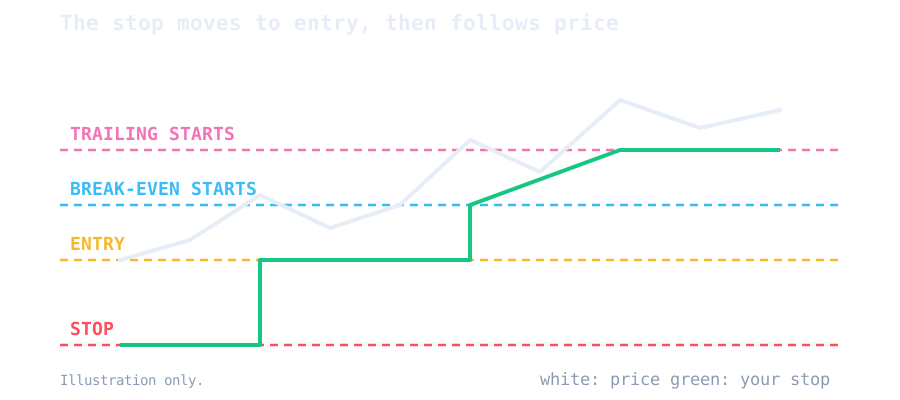
Choose when break-even and trailing start, in ticks, points, multiples of your risk, or when price reaches TP1. Both show as dashed lines on the chart.
Pairs with Unplug Risk Manager
Set your daily rules once. A movable panel on the chart controls your risk, target, break-even and trailing for the Unplug Risk Reward drawings.
Daily loss limit
Stops new entries for the day when your loss reaches the amount you set. Optionally closes your positions too.
Trade limits
Cap the number of trades and of losing trades per day.
Stop after a win
One good trade and you are done for the day, if you want it that way.
Control panel
Risk, contracts, daily limits and buy and sell buttons in one movable panel.
When a rule is hit, new entries are blocked until the next trading day. Your stops and targets are never touched.
One tool, one simple plan
Monthly subscription. Cancel anytime.
Unplug Risk Reward
Contracts from your risk, with automatic stop and targets, for NinjaTrader 8.
- Contracts from your risk
- Up to 5 take profits
- Automatic stop and target orders
- Split exits across targets
- Break-even and trailing stop
- Drag to adjust live orders
- Updates included
- Installation guide
- Customer support
- 1-on-1 coaching on the tool
Unplug Risk Reward questions
More answers on the FAQ page.
Does it place my entry order?
No. The drawing tool does not send entries. You place your entry the way you always do, and when it fills the tool sends the stop and targets. The optional Unplug Risk Manager panel has buy and sell buttons if you prefer to send entries from the chart.
Which account does it use?
The account selected in Chart Trader. If you change the account there, the tool follows it.
What if my position already has a stop from an ATM?
If the position already has a stop, from an ATM strategy or your own, the tool does nothing, so it does not double up.
What if I enter at market?
Turn on the option to protect entries anywhere between your stop and TP1. Otherwise the tool only reacts to fills near the entry line, and you can widen that distance in the settings.
Is it allowed on prop firm accounts?
Rules about automated order tools vary by provider. Confirm with your provider before using automatic orders on a funded account.
What is the 1-on-1 coaching?
A one-on-one session to help you install, set up and learn to use the tool. It covers how the tool works, not trading advice or signals.
Plan the entry. Size the risk.
Pair Unplug Risk Reward with Blockprint, or add the Trade Copier when you trade several accounts.
See Blockprint